CityFibre - Ticketing API
This documentation provides information on the Ticketing API and how to access it.
Please note:
Ticket requests for multiple ServiceID’s at the same time is not currently catered for.
When Tickets are raised, they will then be handled by CityFibre, and updates will be provided to a previously configured endpoint provided by the Ticket Reporter.
In this document, we use Buyer and Supplier for the Service Provider / CityFibre respectively and Reporter as the person within the Buyers Organisation.
This document describes the messages which can pass between Buyer and Supplier, and the various status changes and updates for ticket requests throughout the process.
We recommend that you always perform the Supplier Service Diagnostic request before you raise a Ticket, this will ensure the Buyer is not charged for faults on their own network. You can find the Service Diagnostics API document here.
See diagram Ticketing_API_v1.1 for an overview of the flow.
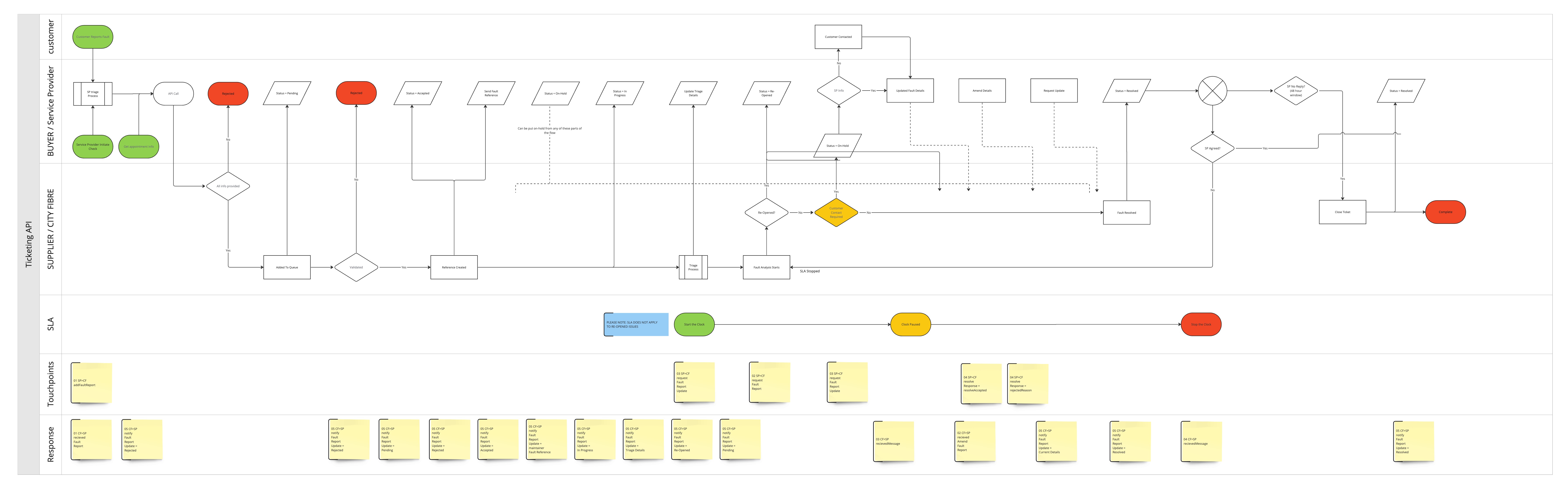
The Buyer detects or is informed of a problem on the network. Reporter gathers any relevant information. The fault is then determined to be within Suppliers network.
The Reporter on the Buyer side can call the API addFaultReport which will validate the details and the ServiceID, once the issue is confirmed a Ticket is raised automatically and then progresses through the workflow until it is resolved.
The Reporter on the Buyer side initiates the process by calling the ticketing API (addFaultReport) to raise a ticket with the Supplier. This ticket should include all relevant information that could be gathered at the time and can include the details for the files to upload.
a. The ticketing API responds with the message ID and status “Pending”.
b. The ticketing API may also respond with a status “Rejected” if the ticket is missing mandatory information or the Service ID is not valid.
c. The ticketing API may also respond with a status “Rejected” if the fault detail type is "Service Outage" (TLOS: Total Loss Of Service) without an Appointment Reservation Key or any other types (Non-TLOS) with an Appointment Reservation Key.
The Supplier stores the ticket information.
Once validated and stored, a notification is sent to the Buyer saying that the ticket status is “Accepted” and has been successfully created. This notification also includes the maintainerFaultReference, which is used along with the buyerFaultReference to identify the ongoing fault. Please note the change from ‘Pending’ to ‘Accepted’ is almost instant if no issues are identified.
At this point the Suppliers Triage is performed on the Service and the fault details are confirmed to the Buyer in the Triage section of the XML using the NotifyFaultReportUpdate. If a fault is found on the Suppliers network, it continues in the Workflow.
When there is more information available, the Supplier can add this information to the ticket. A notification will be sent to the Buyer’s notification endpoint containing a full update using the notifyFaultReportUpdate API.
If the Reporter finds more information, they too can add it using the amendFaultReport API. The Buyer will get a confirmation message for each amendment received by the Supplier.
The Supplier continues to update the Buyer with ticket progress until resolved.
When the ticket is deemed resolved, Supplier will update the ticket status to “Resolved”.
The Buyer should respond with a resolveResponse either accepting or rejecting the solution. If the resolution is rejected, the ticket will be re-opened with status “Re-Opened”.
Once confirmed ‘Resolved’ the ticket can be closed.
If no reply is received from the Buyer after a fault is resolved for 48 hours, then the fault status is changed to ‘Closed’ and it is automatically Accepted from the Suppliers standpoint.
If the Supplier needs more information from either the Buyer or the Buyer’s End User the Ticket is put into an ‘on-hold’ status that will pause the SLA. The reasons for pausing are only when delays are out of the Suppliers hands.
To contact the Buyer’s End User, the Suppliers NOC (Network Operational Centre) team makes the appointment, they would call the Customer and make arrangements if a site visit is needed. They follow the process of leaving a message if possible and a further two call attempts. Once the information is received or the appointment is booked the SLA can be aligned to start again and the Ticket status will be moved back to ‘In Progress’.
The API is accessed via HTTPS. Calls are made by POST, sending XML as the HTTP body.
Messages are exchanged using SOAP exchanges over HTTPS POST, where the request is in the POST body and the response is in the HTTP response body. Messages are encapsulated in a SOAP envelope using Document/Literal style following WS-Basic Profile 1.0.
        <soap:Envelope xmlns:soap="http://schemas.xmlsoap.org/soap/envelope/">
            <soap:Body>
                 ... single request or response element goes here ...
            </soap:Body>
        </soap:Envelope>
Authentication is by means of HTTPS client certificate. It is also restricted to pre-agreed source IP addresses.
CityFibre provides two pre-production environments for the Buyer to integrate with, to allow the Buyer to test the API endpoint before going live.
Below are the details for these environments:
Production: https://api-gw.cityfibre.com:41223/prod/api2
Ticketing Notification End Point
Buyer must provide the endpoint to receive Ticket update notifications.
The buyer can query appointment availability, reserve an appointment and include the reservation key in the order request. If this is not done, the order will go into a waiting state and not progress, the buyer will need to reserve an appointment and then amend the order to include the appointment reservation key before the order can complete. Reappoint is an additional query and reserve, then an amend with the new CAMS ID on the appointment reservation key field.
Request
| Date | Change |
|---|---|
| 28/05/2025 | Update the 'type' attribute to 'Service Outage' in the add/amend fault example |
| 19/09/2024 | Corrected grammatical issues and spelling mistakes |
| 25/07/2024 | Added appointments to Notify Appointment Missed |
| 25/07/2024 | Added appointments to Notify Fault Report In Progress. Added appointment confirmation status, cancelld and closure code. Added open and canceled statuses |
| 24/07/2024 | Updated optional fields, non-empty strings. Added 'updates' and 'attachments' in fault repors |
| 12/04/2024 | Updated 40x and added 500 response schema for several requests |
| 09/04/2024 | Added notification for Fault cancellation and removed maintainerfault reference from notify fault report rejected |
| 03/04/2024 | Removed unused certificate and request section from XSD component |
| 27/03/2024 | Updated 400 response schema from amend fault |
| 25/03/2024 | Fixed the 'appointment' tag for addfault and amendfault |
- Mock serverhttps://ticketing.docs.cityfibre.com/_mock/openapi/changeLog.txt
- Get the revision history for the documentationhttps://ticketing.docs.cityfibre.com/Ticketing API/v1/changeLog.txt
- Payload
- Curl
- Node.js
- JavaScript
- PHP
- Python
No request payload